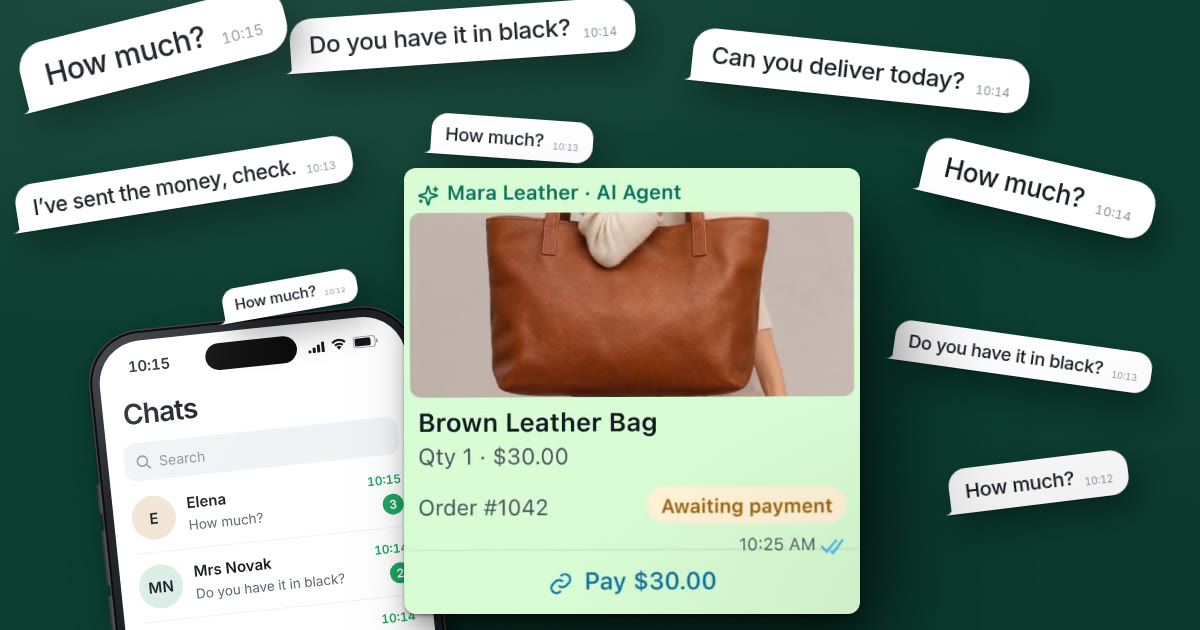
You post a new bag on your WhatsApp status. Within an hour, 30 people have messaged.
"How much?" "Do you have it in black?" "Can you deliver today?" "I've sent the money, check."
You answer the same question 30 times. Somebody pays and you can't find their chat. Somebody else asked for black and you packed brown. By the end of the day you've made sales, but you don't actually know how many, who has paid, or what still needs to go out.
Here's how to take orders on WhatsApp without losing track of a single one. WhatsApp is a great place to talk to customers, but it was never built to run your orders.
Why WhatsApp orders slip through
Three things go wrong for almost every WhatsApp seller:
- You become a price list. Every customer asks the same questions, and every answer is you typing.
- Payments live in a different app. "I've paid" in the chat means opening your bank app, scrolling, and matching amounts by hand.
- Orders are scattered across chats. There's no single place that says: 12 orders today, 9 paid, 4 delivered.
Most sellers fix this with a notebook, a spreadsheet, or a pinned chat to themselves. It works until a busy day, and then it doesn't.
How to take orders on WhatsApp with your AI Agent
Connect your WhatsApp to Queek, and your AI Agent answers your customers for you, right inside the same chat. It reads your product list, so it knows your prices, sizes and colours.
Here's what your customer sees:
Customer: Hi! Is the brown leather bag still available?
Your shop: Yes, it's in stock! Here it is:
Customer: I'll take it. How do I pay?
Your shop: Done! I've put your order together:
The customer picks the item, gets the total and a payment link, and pays, all without you typing a word. When the payment comes through, the order is marked paid.
You stay in control. You choose which products are available in chat, and you can still read every conversation.
Every chat order lands in one list
This is the part that ends the chaos. Every order taken in WhatsApp shows up in your Queek orders list, labelled with where it came from. Orders from your website and your counter sit right next to them.
So at the end of the day you're not scrolling through chats. You open one list and see what came in, what's paid, and what still needs to go out.
And it's not only WhatsApp. Connect Instagram and Telegram too, and orders from those DMs land in the same list.
Set it up in 4 steps
- Create your Queek store. Sign up free at usequeek.com and pick the type of business you run.
- Add your products. Name, price, photos, sizes and colours. This is the list your AI Agent sells from.
- Connect your WhatsApp. Open Inboxes in Queek and connect your WhatsApp. Add Instagram and Telegram if you sell there too.
- Choose what sells in chat. Turn on the products you want customers to order in WhatsApp, then share your number or link as you normally do.
From then on, a customer who messages you can browse and order in the chat, pay through the link your AI Agent sends, and you get the order in your list.
Which plan you need
Inboxes come with the Social Media plan, built for businesses that sell through WhatsApp, Instagram and Telegram. They're also included on Growth, Scale and Enterprise.
Queek takes no commission on orders from your own chats. The payment provider's normal fee applies to online payments, and it can be paid by the customer. Collecting into your own payment provider account needs Growth, Scale or Enterprise; the Social Media plan doesn't include it. See which payment options work in your country on the payments page.
Stop running your business from your chat list
Your customers already want to buy from you on WhatsApp. Meet them there. You just need the orders to stop slipping through.
Start free on Queek and take your next WhatsApp order the easy way.
Frequently asked questions
Do I need a website to take orders on WhatsApp with Queek?
No. Queek uses the same product list for your chats, your website and your counter, but you can sell in WhatsApp alone. Customers order in the chat and pay through the link your AI Agent sends.
How do customers pay for WhatsApp orders?
When the customer is ready, your AI Agent gives them the total and a payment link in the chat. When an online payment comes through, the order is marked paid for you. Which payment options you can offer depends on your country and plan.
Does Queek take a cut of my WhatsApp orders?
No. Orders from your own WhatsApp, Instagram and Telegram carry no Queek commission. You pay your plan, and the payment provider's normal fee applies to online payments.
Which plan do I need?
Inboxes come with the Social Media plan and with Growth, Scale and Enterprise.